

Technical
Documentation
Architecture, formula references, screenshots, and representative output for systems built across the work documented in this portfolio. Select a story from the sidebar to view its documentation set.
Each entry documents a real artifact: code, a financial model, or a compliance tracking system. Each has enough depth to distinguish a system that was actually built from one that was summarized after the fact.
An integrated operations platform built in self-taught VB.NET to replace fragmented official tooling at the Air Force Enterprise Service Desk. Unifies multi-domain identity resolution, diagnostics execution, structured data translation, and rule-based workflow enforcement into a single continuous operator workflow. The system spread organically to geographically distributed bases because it solved the operational problem better than the official tools.
The Computer Toolkit (diagnostics, left) and Account Search (identity lookup, right) open simultaneously, demonstrating the MDI parallel workflow architecture. Both child windows are live and independent. Multi-timezone clock bar runs across the bottom of the MDI frame.
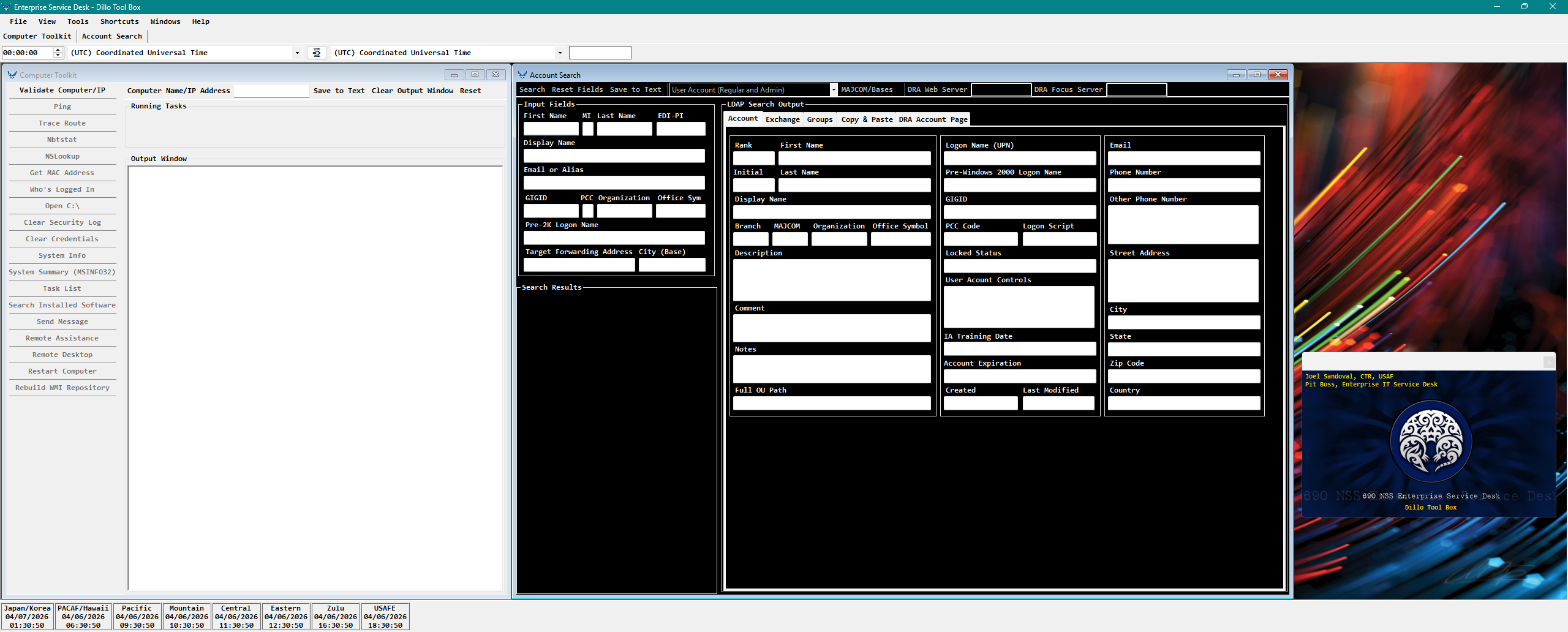
Enterprise Service Desk - Dillo Tool Box. Computer Toolkit (left) with full diagnostics command list. Account Search (right) with input fields and LDAP output panel, Account tab active.
These operations write results directly to the session log, building the running troubleshooting record.
- Ping: 2-packet connectivity test, resolves FQDN and IP
- Trace Route: full hop trace with latency per hop
- Nbtstat: NetBIOS name table including MAC address
- NSLookup: DNS forward lookup, returns authoritative server
- Get MAC Address: hardware address retrieval
- Who's Logged In: resolves active user session and cross-references display name from directory
- Clear Security Log: remote event log clear
- Clear Credentials: ActivClient credential flush via remote command
- System Info: inline OS and hardware summary
- Task List: running process enumeration
- Search Installed Software: registry-based software inventory
- Send Message: enables Remote RPC via registry, then delivers a pop-up message to all active sessions on the target
- Remote Assistance: offers unsolicited msra session; returns confirmation string inline
These operations launch GUI tools. No output is written to the session log.
- Open CMD: opens a command prompt targeted at the remote machine context
- Remote Desktop (RDP): launches mstsc to the validated target
- System Summary (MSINFO32): opens Microsoft System Information GUI for the remote computer
- Restart Computer: confirmation dialog required before execution
- Rebuild WMI Repository: generates and runs a dependency-ordered batch script; returns success or failure string inline
Any combination of these fields drives the LDAP query. The system performs multi-domain traversal automatically.
- First Name, MI, Last Name, EDI-PI, Display Name
- Email or Alias, GIGID, PCC, Organization, Office Symbol
- Pre-2K Logon Name, Target Forwarding Address, City (Base)
- Rank, First Name, Logon Name (UPN), Email, Initial, Last Name
- Pre-Windows 2000 Logon Name, Phone Number, Display Name, GIGID, Other Phone Number
- Branch, MAJCOM, Organization, Office Symbol, PCC Code, Logon Script
- Description, Locked Status, Street Address, Comment, User Account Controls
- City, Notes, IA Training Date, State, Full OU Path, Account Expiration, Zip Code
- Created, Last Modified, Country
- OCS Enabled, OCS SIP Address, OCS Server
- Alias, Hidden From GAL, Exchange Server, Exchange Store, Target Address
- Populate Detailed Group Information triggers a separate LDAP query against the groups attribute, displaying all AD group memberships in a dedicated output area
- Formats selected attributes for direct Remedy ticket entry, creating the workflow chain from account lookup to template builder without manual transcription
The Template Generation Module as a live interface. Structured input fields on the left drive automated construction of a formatted Remedy ticket body. Ticket type (New, Update, Callback Queue) controls which sections are populated and which input fields are required.
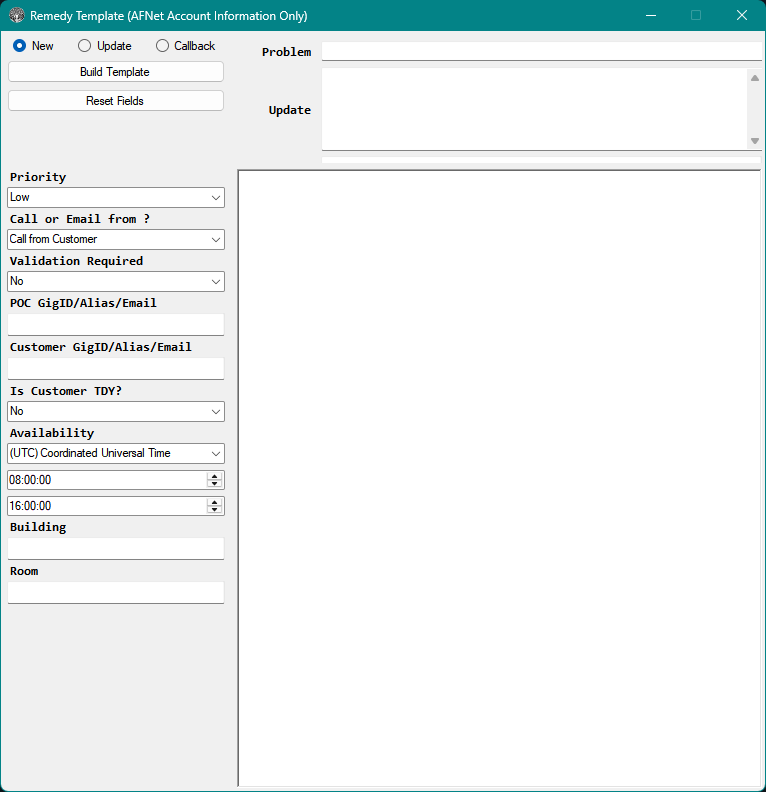
- Priority: Low, Medium, High, Critical. High triggers mandatory 24-hour contact number prompts before the template body is generated.
- Call or Email from?: Contact method that drives the opening line of the ticket body.
- Validation Required: Yes/No. Activates the IAO verification block including Validation Authority, DSE sender, and verification method.
- POC and Customer GigID/Alias/Email: Accepts identifiers copied from the Account Search Copy and Paste tab.
- Is Customer TDY?: Modifies the customer location block in the output by adding a TDY location field.
- Availability: UTC timezone default with start and end time spinners that populate the customer availability window for callback scheduling in Zulu time.
- Building and Room: Physical location for on-site dispatch routing.
The UserOutputBuilder renders the raw LDAP attribute set into this structured, labeled format. The ASCII art header resolves the account display name into a consistent visual anchor. All timestamps are normalized to Zulu time. Extension Attribute 14 is decoded character-by-character into its five operational meanings. Proxy addresses display SMTP in uppercase for the primary address and smtp in lowercase for aliases, a directory convention preserved exactly in the output.
    /\  _ _ _ _ _ _ _ _ _ _
   / /
  /--\
 <-  <  - = DOE, JOHN M CTR CONTOSO West/Operations = = = = -
  \--/
   \ \  _ _ _ _ _ _ _ _ _ _
    \/

=======================================================
User Information
=======================================================
Personal Information
--------------------
Rank: CTR
First Name: JOHN
Middle Initial: M
Last Name: DOE
Nationality: US

Organization Information
------------------------
Service Branch: CONTOSO
MAJCOM: WEST
Organization: West/Operations/Service Desk
Office Symbol: ESD

Contact Information
-------------------
DSN Phone Number: 555-010-0100
Other Phone Number: 555-020-0200
Street Address: 1000 Example Rd Bldg 5000
City: Seattle
State: WA
Zip Code: 98101
Country: US

=======================================================
CONTOSO Account Information Query
=======================================================
Logon Information
-----------------
Logon Name: [email protected]
Pre-2K Logon Name: john.m.doe.ctr
SID: S-1-5-21-0000000000-0000000000-0000000000-00000
IA Training Date: 3/15/2011 12:00:00 AM Zulu Time
Lockout Status: Account is Unlocked
Account Expiration: 9/30/2011 12:00:00 AM
User Account Controls
---------------------
Account is Enabled
Smartcard Required

Profile Information
-------------------
GIGID: 0000000000
Personnel Category Code (PCC): E (Contract Employee)
Logon Script: \\contoso.com\netlogon\logon.vbs
Home Directory Drive Letter: H:
Home Directory Path: \\DVRSRV-FS-001\users$\john.m.doe.ctr
Created On: 6/14/2010 3:22:15 PM Zulu Time
Last Modified On: 8/17/2011 9:45:33 AM Zulu Time

Comment: ESD Operator

Description: CTR/Operations/West/CONTOSO/SEATTLE WA

Notes:

Full OU Path: CN=DOE.JOHN.M.0000000000,OU=Contractors,OU=Operations,OU=West,OU=Sites,DC=CONTOSO,DC=COM

=======================================================
Exchange Account Information
=======================================================
OCS Information
---------------
OCS Enabled: TRUE
OCS SIP Address: sip:[email protected]
OCS Server: DVRSRV-OC-001

Exchange Information
--------------------
Exchange Server: DVRSRV-EX-001
Exchange Store: SG1-DB1
GECOS: DVRSRV-EX-002

Mailbox Attributes
------------------
Display Name: Doe, John M CTR CONTOSO West/Operations
Managed By: SMITH.JANE.A.0000000001 | Smith, Jane A Mgr CONTOSO

Address Book(s) the account is shown in
------------------
Default Global Address List
All Users

Hidden From GAL: False
Alias: john.m.doe.ctr
Target Forwarding Address:
Mailbox Size Category (Extension Attribute 5): 03
Default Size Used: True
Extension Attribute 14: 10320
  1. First Character indicates the state of an account in reference to Directory Write-Back.
  2. Second character indicates the state of the account within the messaging system.
  3. Third character indicates whether the account has been updated by the identity management system.
  4. Fourth character is a toggle to ensure an update is visible to the directory.
  5. Fifth character is a flag to indicate the status of a corresponding secondary network account.

The data contained in each character within the string corresponds to definition provided below.
  1  Character: Write-Back successfully completed
  0  Character: Uninitialized Value
  3  Character: Toggle between values. Used to force an update to all associated directories.
  2  Character: Secondary network account create confirmation
  0  Character: Uninitialized Value

User's email addresses.  All caps "SMTP" indicates the primary SMTP
---------------------------------------------------------------------
SMTP:[email protected]
smtp:[email protected]

=======================================================
Groups Membership Information
=======================================================
WEST_OPS_ALL_USERS
WEST_OPS_ESD_OPERATORS
UDG_WEST_SEATTLE_ALL_USERS
UDG_CONTOSO_MAIL_USERS
UDG_WEST_OPS_ALL_USERS
Representative session log showing Directory Info, Ping, Who's Logged In, and Send Message executed in sequence. Each operation appends to the same RichTextBox output. The section header wrapper is consistent across all inline-output operations, making the accumulated log readable as a structured document. This session log can be pasted directly into a Remedy ticket as a complete troubleshooting record.
    /\  _ _ _ _ _ _ _ _ _ _
   / /
  /--\
 <-  <  - = DVRCLT-WS-4217 = = = = -
  \--/
   \ \  _ _ _ _ _ _ _ _ _ _
    \/

Computer Name: DVRCLT-WS-4217

Operating System: Windows 7 Enterprise, Version 6.1 (7601), Service Pack 1

Full OU Path: CN=DVRCLT-WS-4217,OU=Workstations,OU=Seattle,OU=West,OU=Sites,DC=CONTOSO,DC=COM

Computer Physical Location: Seattle/Bldg 5000/Rm 214B

Computer DNS/FQDN: DVRCLT-WS-4217.west.contoso.com

Computer is Enabled

Description: Standard Workstation - Operations

Comment:

Created On: 3/15/2010 2:30:00 PM

Last Modified On: 8/12/2011 11:45:22 AM


=======================================================
Ping Results for DVRCLT-WS-4217
=======================================================

Pinging DVRCLT-WS-4217.west.contoso.com [10.10.50.125] with 32 bytes of data:
Reply from 10.10.50.125: bytes=32 time<1ms TTL=128
Reply from 10.10.50.125: bytes=32 time<1ms TTL=128

Ping statistics for 10.10.50.125:
    Packets: Sent = 2, Received = 2, Lost = 0 (0% loss),
Approximate round trip times in milli-seconds:
    Minimum = 0ms, Maximum = 0ms, Average = 0ms

=======================================================
Who's logged In Results for DVRCLT-WS-4217
=======================================================
Doe, John M | Doe, John M CTR CONTOSO is currently logged in to this computer

=======================================================
Sending Message to DVRCLT-WS-4217
=======================================================
"Please save your work and restart your computer to apply updates." was sent to all users currently logged into DVRCLT-WS-4217
Full new ticket body assembled from structured input fields. Section headers, labels, and formatting are generated by the code. Technicians enter data into form fields, not free text, which enforces consistent structure across all tickets regardless of which technician created them.
Priority Matrix states ticket is: Medium

Received Call from Customer

Contact Information
--------------------------
Contact Name: Williams, Robert C SSgt CONTOSO
Contact Phone Numbers: 555-010-0175

Customer Information
--------------------------
Customer Name: Doe, John M CTR CONTOSO
Customer EDI-PI: 0000000000
Customer Phone Numbers: 555-010-0100
Home Station is: Seattle
Customer availability timeframe (in Zulu): 1400 to 2200 ZULU
Building (Site+): Bldg 5000
Room (Desk Location): Rm 214B

Technician Notes
----------------------------
Problem: Customer states unable to access email via OWA.  Customer receives
"You don't have permission to access this resource" error when attempting
to log in at https://mail.contoso.com.  Customer confirms CAC is inserted
and certificates are valid.  Issue began this morning at approximately
0800 local.  Customer has tried two different workstations with the same
result.  No other users in the office are reporting the same issue.

Update: Verified customer account in directory.  Account is enabled.
Smartcard required flag is set.  Mail server is DVRSRV-EX-001, store
SG1-DB1.  Account is not hidden from GAL.  proxyAddresses show primary
SMTP as [email protected].  No forwarding address set.
Extension Attribute 14 shows 10320 (write-back complete, messaging
uninitialized, directory toggle active, secondary network account
confirmed).  Checked group membership — customer is member of
UDG_CONTOSO_MAIL_USERS and WEST_OPS_ALL_USERS.  No anomalies
detected in directory attributes.  Escalating to Tier 2 messaging
team for mail server-side investigation.

Way Ahead: Escalate to Tier 2 Messaging.  Tier 2 to verify mailbox
health on DVRSRV-EX-001 and check OWA virtual directory configuration.
Customer advised ESD will follow up within 4 hours.
High priority triggers mandatory InputBox prompts for 24-hour DSN and commercial contact numbers before the template body is generated. The Validation Required block activates the IAO verification section. TDY status adds the "Customer is TDY at:" field. Each conditional block is a rule encoded in the system, not a formatting preference.
Priority Matrix states ticket is: High

High incidents require 24 hour contact number
--------------------------------------------------------------------------
DSN: 555-010-0100
Commercial: 555-020-0200

Received Call from Other

Other Information
--------------------------
Call was received from Martinez, Carlos J Capt CONTOSO

Trusted Agent Validation Required:  Yes

Validation Information
----------------------------------
Validation Authority: IAO
Digitally Signed Email (DSE) from: Thompson, Lisa R TSgt CONTOSO
Digitally Signed Email (DSE) is attached to ticket: Yes
Verified Validation through: GAL Lookup

Contact Information
--------------------------
Contact Name: Williams, Robert C SSgt CONTOSO
Contact Phone Numbers: 555-010-0175

Customer Information
--------------------------
Customer Name: Doe, John M CTR CONTOSO
Customer EDI-PI: 0000000000
Customer Phone Numbers: 555-010-0100
Home Station is: Seattle
Customer is TDY at: Denver
Customer availability timeframe (in Zulu): 1400 to 0200 ZULU
Building (Site+): Bldg 2200
Room (Desk Location): Rm 101

Technician Notes
----------------------------
Problem: Customer account is disabled.  Customer requires account
re-enablement.  IAO has verified identity and submitted DSE.

Update: Verified DSE is attached to ticket.  Confirmed IAO
Thompson, Lisa R is listed as IAO for Seattle via directory group
membership (UDG_WEST_SEATTLE_IAO).  Validated customer identity
via GAL lookup.  Account re-enablement requires Tier 2 action.

Way Ahead: Escalate to Tier 2 Identity Management for account
re-enablement.  Customer and IAO advised of escalation.
The CBQ engine implements six scenario branches. Each branch controls which fields appear in the output and whether the CB.ddMMMyy.HHmm.ZULU time encoding is embedded in the Problem field. Select a scenario to view its output.
Technician Notes
----------------------------
Problem: CB.04Apr26.1400.ZULU Customer states unable to access email
via OWA.

Update: Called Williams, Robert C SSgt CONTOSO at 555-010-0175 listed
as the contact number at 03Apr26 1209 ZULU. No one answered the phone.
Left voice mail requesting customer to contact the ESD.

Way Ahead: Next callback attempt scheduled for 04Apr26 1400 ZULU.
Technician Notes
----------------------------
Problem: CB.04Apr26.1600.ZULU Customer states unable to access email
via OWA.

Update: Called Doe, John M CTR CONTOSO at 555-010-0100 listed as the
contact number at 03Apr26 1209 ZULU. No one answered the phone. Left
voice mail requesting customer to contact the ESD.

Way Ahead: Next callback attempt scheduled for 04Apr26 1600 ZULU.
Technician Notes
----------------------------
Problem: Customer states unable to access email via OWA.

Update: Called Doe, John M CTR CONTOSO at 555-010-0100 listed as the
contact number at 03Apr26 1209 ZULU.

Tier 2 resolution has been applied.  Walked customer through clearing
browser cache and retesting OWA.  Customer confirms email access is
restored.

Way Ahead: Issue resolved.  Closing ticket.
Technician Notes
----------------------------
Problem: CB.04Apr26.1800.ZULU Customer states unable to access email
via OWA.

Update: Called Doe, John M CTR CONTOSO at 555-010-0100 listed as the
contact number at 03Apr26 1209 ZULU. Customer answered.  Customer is
busy.  Customer requested call back at 04Apr26 1800 ZULU.

Way Ahead: Callback scheduled per customer request.
Technician Notes
----------------------------
Problem: Customer states unable to access email via OWA.

Update: Called Doe, John M CTR CONTOSO at 555-010-0100 listed as the
contact number at 03Apr26 1209 ZULU.

Walked customer through clearing browser cache and retesting OWA.
Customer confirms email access is restored.

Way Ahead: Issue resolved.  Closing ticket.
Technician Notes
----------------------------
Problem: CB.04Apr26.1400.ZULU Customer states unable to access email
via OWA.

Update: Called Doe, John M CTR CONTOSO at 555-010-0100 listed as the
contact number at 03Apr26 1209 ZULU.  Martinez, Carlos J Capt CONTOSO
answered.  Customer is not available.  Customer will be available at
04Apr26 1400 ZULU.

Way Ahead: Callback scheduled per coworker information.
The IOC is a continuous workflow system, not a collection of separate features. Each module feeds the next. Directory info gates diagnostics. Account lookup populates the template builder. The template builder enforces ticket structure. A technician can move from receiving a call to a completed, formatted ticket without switching applications or looking up reference material.
- Enter computer name or IP address in the Computer Toolkit
- Directory Info runs automatically as the gateway operation
- All other diagnostic commands remain disabled until Directory Info succeeds
- The session log is initialized with the computer's AD record as a visual anchor
- Each command appends results to the running session log in sequence
- Inline results (Ping, Tracert, Who's Logged In) accumulate in the same scrolling window
- External tools (RDP, MSINFO32) open separately without disrupting the session log
- The complete session log can be pasted into the ticket at any point as a structured troubleshooting record
- Search by any identifier in the Account Search window
- The system traverses multiple domains automatically, no manual domain selection required
- Results populate across Account, Exchange, Groups, Copy and Paste, and DRA Account Page tabs
- Use the Copy and Paste tab to format account identifiers for the template builder
- Select ticket type: New, Update, or Callback Queue
- Fill structured input fields; the system enforces required fields based on ticket type and priority
- Click Build Template; the output panel populates with a fully formatted, section-labeled ticket body
- Paste directly into Remedy; no reformatting required
When a ticket is returned to the callback queue, the technician selects one of six interaction outcomes. The system generates different output based on what happened during the callback attempt.
- Call not answered (called POC): voicemail left, next callback time embedded in Problem field
- Call not answered (called Customer): voicemail left, next callback time embedded in Problem field
- Customer answered but is not available: callback scheduled per customer request, time embedded in Problem field
- Third party answered, customer not available: callback scheduled per coworker information, time embedded in Problem field
- Customer answered and is available: walked through resolution, issue confirmed resolved, ticket closes
- Third party answered, customer available: same resolution path, ticket closes
A telemetry system logging display name, machine name, and UTC timestamp was built in to measure adoption scope. It was deliberately commented out after adoption at geographically distributed bases (Hickam, Ramstein, Gunter) was confirmed through ticket formatting signatures. Building the measurement mechanism, using it, then disabling it after the data was useful is a design pattern, not an afterthought.
- Platform: VB.NET WinForms
- UI Model: MDI (Multiple Document Interface) supporting parallel investigation workflows across concurrent child windows
- Design Approach: Modular with shared services layer
- Execution Model: Event-driven with background threading for long-running operations
Sanitized representation. Real system names, domain values, and production infrastructure references have been removed.
- Hosts all operational modules as child windows
- Manages shared state and resources across modules
- Multi-timezone clock bar spanning Japan/Korea through USAFE, providing accurate timestamp reference for ticket documentation across MAJCOM boundaries
- Performs directory searches across multiple domains with cross-domain traversal and fallback logic
- Correlates identity data across domains and normalizes LDAP output into consistent structures
- 57-plus attribute account property viewer with decoded AD values and migration status detection
- Standardized execution layer over native Windows tools, normalizing syntax and reducing operator error
- Gateway enforcement: Directory Info must complete before all other commands are enabled
- Mixed execution model: inline-output operations, external-window operations, and batch-script operations each have distinct output behaviors
- Continuous session log accumulates all inline results in sequence, creating a structured troubleshooting record
- Background threading prevents UI blocking during diagnostics execution
- Rule-based workflow engine for ticket lifecycle management, not a formatting tool
- Enforces structured input based on operational context and generates standardized outputs based on workflow state
- Three lifecycle modes: New, Update, and Callback Queue with six scenario-branching outcomes
- Structured time encoding: CB.ddMMMyy.HHmm.ZULU embedded in the Problem field, encoding the next callback deadline directly into the ticket
- Dynamically identifies valid directory endpoints, eliminating reliance on static infrastructure mappings
- Multi-stage validation: DNS resolution, network reachability, directory service validation
- Self-healing: locates the correct domain controller without manual intervention in a dynamic IP environment
- Directory query abstraction, command execution wrapper, XML configuration management
- Attribute decoding utilities, UI helper functions
- Reusable across all modules, reducing duplication and maintaining consistent behavior
- MainForm.vb - application controller and MDI container
- IdentityLookupForm.vb - directory search interface
- DiagnosticsForm.vb - system diagnostics interface (Computer Toolkit)
- TemplateBuilderForm.vb - structured output generation and CBQ workflow engine
- Modules.vb - shared services layer including wmirebuild() at line 853
- XML configuration files for domain registry, user preferences, saved datasets
All Computer Toolkit operations route through a central threads(com1) method in Diagnostics.vb. The com1 parameter selects the operation.
| com1 | Operation | Line | Output model |
|---|---|---|---|
| Ping | ping -n 2 [target] | 163 | Inline to session log |
| Tracert | tracert [target] | 169 | Inline to session log |
| nslookup | nslookup [target] | 174 | Inline to session log |
| nbtstat | nbtstat -a [target] | 157 | Inline to session log |
| cshare | explorer \[target]\c$ | 194 | External window, no output |
| msinfo32 | MSINFO32 /computer [target] | 218 | External window, no output |
| sendmsg | reg add (RPC) + msg * /server:[target] | 235 | Inline, own format |
| rassist | msra /offerRA [target] | 241 | Inline confirmation |
| rdp | mstsc /v [target] | 247 | External window, no output |
| restartcomp | shutdown /r /t 1 /m \\[target] | 253 | External, confirmation required |
| wmirebuild | Generated batch via wmirebuild() | 259 | Success or failure string |
Generates full new ticket body. High priority variant at line 92: when Priority = "High", InputBox prompts for 24-hour DSN and commercial contact numbers before template body is generated. These prompts are not optional.
Generates update block for existing ticket. Preserves the Problem field from the existing ticket and appends a structured Update and Way Ahead block.
Callback Queue workflow engine. Six scenario branches driven by the outbndwhoansweredcb dropdown selection. Each branch controls field visibility and whether the CB.ddMMMyy.HHmm.ZULU encoding appears in the Problem field.
| Variable | Purpose | Risk |
|---|---|---|
| DomainRegistry | List of available domains | Shared mutation risk |
| ConfigDocument | XML configuration storage | Concurrency risk |
| UIThemeSettings | UI configuration | Low risk |
- Positional array indices create fragility on schema changes
- Attribute decoding makes assumptions about encoded format
- UI and logic are tightly integrated in form classes; a modernization effort would benefit from extracting business logic into separate service classes
A 10-year NOI model built from scratch to determine a defensible, profitable rent rate for a commercial lease negotiation. 999-scenario sensitivity table, renovation toggle engine, live break-even calculation, and property tax escalation chain extended to 2048. Built with no prior real estate or financial modeling experience, using the Excel feature set available at the time of construction.
The complete worksheet showing the functional zone layout: summary panel at top, rate construction block and renovation toggle engine in the middle, tenant service toggles, broker fee, property tax escalation chain, and the start of the 999-row sensitivity table at the bottom. Color coding distinguishes inputs (green) vs calculated cells
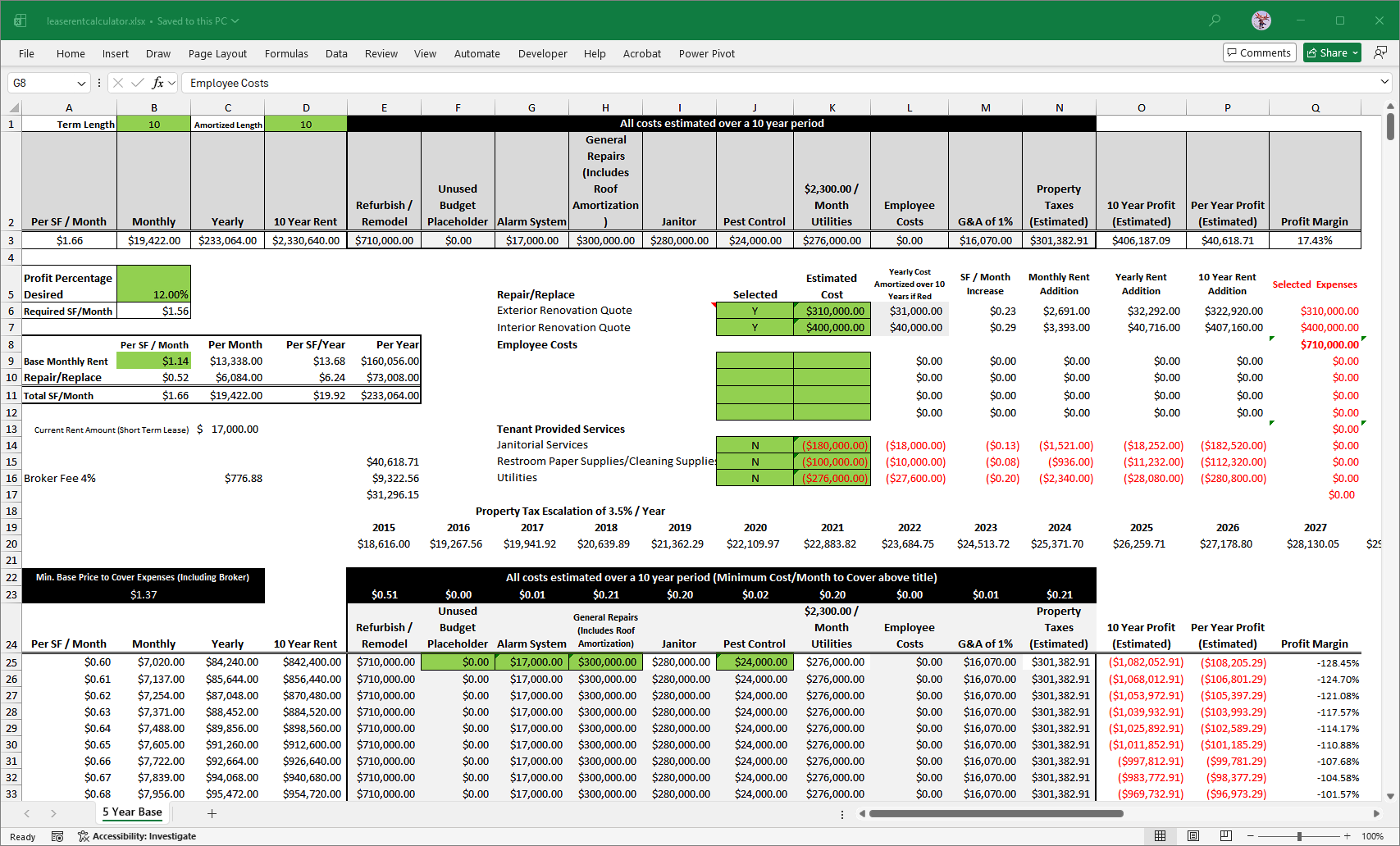
leaserentcalculator.xlsx — 5 Year Base sheet. Summary panel (rows 1-3) showing active rate $1.66/SF with $406,187 10-year profit at 17.43% margin. Rate construction block (rows 9-11). Renovation toggle engine with exterior ($310K) and interior ($400K) both selected Y. Tenant service toggles (rows 14-16) all set to N. Property tax escalation chain (rows 19-20). Break-even at $1.37 (row 22). Sensitivity table starting at row 25.
The break-even row (row 22-23) and sensitivity table header (row 24), showing the minimum base price of $1.37/SF and the cost component breakdown across all columns. Each column header in row 23 shows the per-SF/month contribution of that cost category. Row 24 labels the sensitivity table columns. The highlighted cells (alarm system, general repairs, pest control) show costs included at the active renovation toggle settings.

Rows 19-25. Property tax escalation chain years 2015-2027 (row 20). Break-even summary (rows 22-23): $1.37 minimum base price, cost components totaling $0.51 renovation + $0.01 alarm + $0.21 repairs + $0.20 janitor + $0.02 pest control + $0.20 utilities + $0.01 G&A + $0.21 property taxes. Sensitivity table header (row 24) and first scenario row at $0.60/SF (row 25).
Rows 25 onward showing the sensitivity table at $0.01 increments. Each row is a self-contained scenario. All cost columns populate consistently across every row. The 10-year profit column (red parentheses) shows below-break-even scenarios. The table extends through $10.35/SF, covering every realistic negotiation range.
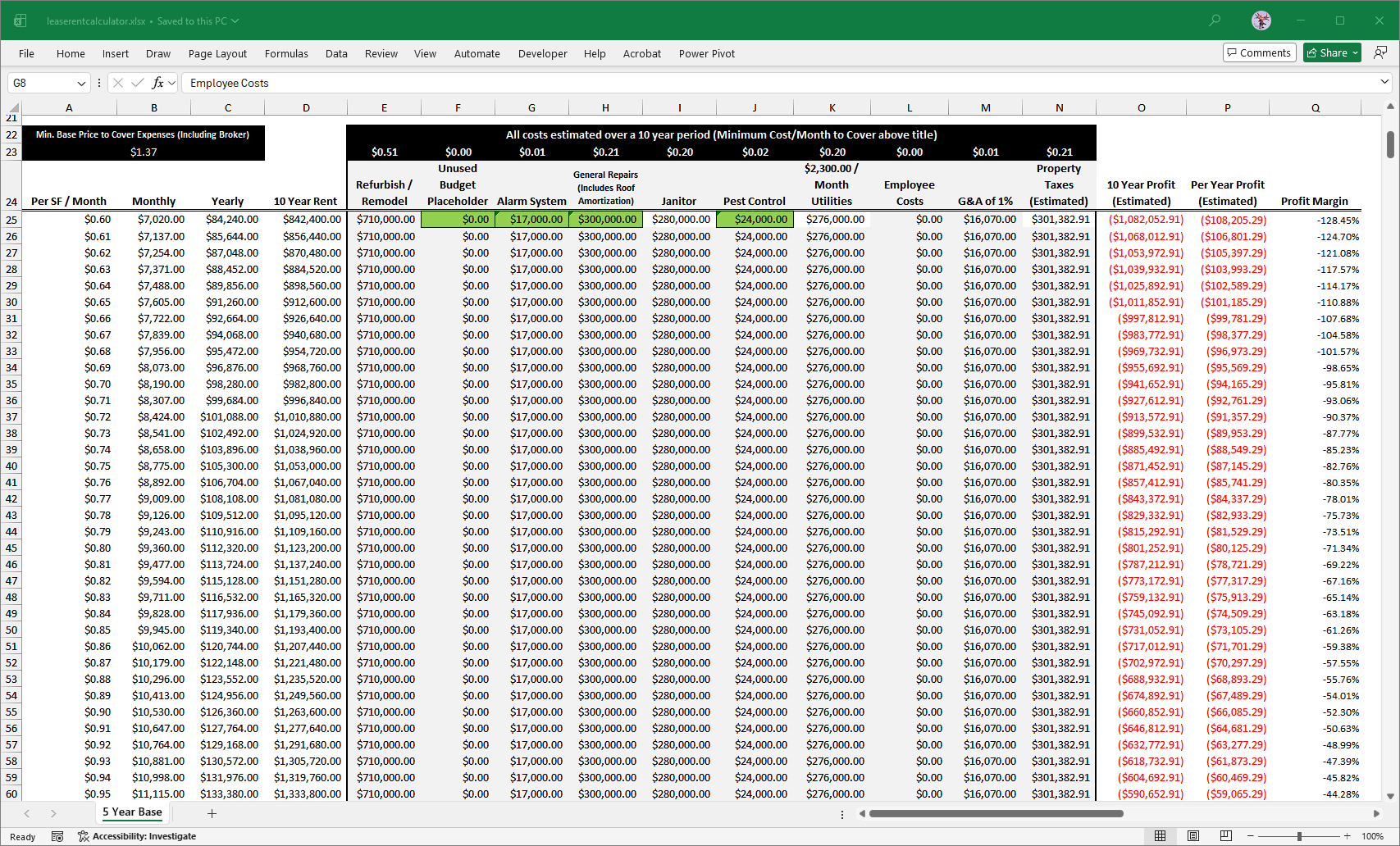
Sensitivity table rows 25-33 ($0.60 to $0.68/SF). Rate column A, monthly/annual/10-year rent columns B-D, cost columns E-N, 10-year profit column O (red), annual profit column P (red), profit margin column Q.
- Row 2 contains column headers. Row 3 displays the active rate scenario results, all driven by LOOKUP against the named range PERSFMO.
- Changing the rate input in B11 causes all summary figures to update immediately without manual recalculation.
- B9: Base monthly rent per SF ($1.14) - the negotiated base component
- B10: Repair/replace rate - pulls from renovation toggle engine output at R8
- B11: Total rate ($1.66) - ROUNDUP sum of B9 and B10; serves as the LOOKUP key for the summary panel
- Column J holds Y/N selectors for each renovation line item
- Exterior renovation ($310,000) and interior renovation ($400,000) both set to Y in the active model
- Selected items are amortized over the term, converted to SF/month rate, and aggregated into R8
- R8 feeds B10, which feeds B11, which feeds the summary panel LOOKUP
- Janitorial ($1,500/month), restroom supplies (flat estimate), utilities ($2,300/month)
- All three set to N in the active model - landlord absorbs these costs in the negotiated rate
- Toggling any to Y reduces the landlord cost basis and lowers the break-even rate
- 2015 base year ($18,616 actual) through 2048, 3.5% annual compounding
- Extended beyond the 10-year term to cover potential renewal periods
- Row 23 decomposes all cost categories to SF/month contributions. Row 22 (A23) sums them to the break-even rate ($1.37/SF).
- Any negotiated rate above $1.37 produces positive margin. The negotiated rate of $1.66 produces a 17.4% margin.
The summary panel at the top of the worksheet displays all key figures for the currently active rate scenario, resolved dynamically via LOOKUP against the sensitivity table. At the negotiated rate of $1.66/SF:
| Line Item | Per SF/Mo | Monthly | Annual | 10-Year |
|---|---|---|---|---|
| Base Monthly Rent | $1.14 | $13,338 | $160,056 | $1,600,560 |
| Repair/Replace (renovation amortized) | $0.52 | $6,084 | $73,008 | $730,080 |
| Total Rate (negotiated) | $1.66 | $19,422 | $233,064 | $2,330,640 |
| Metric | Value | Notes |
|---|---|---|
| Minimum to cover all expenses incl. broker | $1.37/SF | Break-even floor |
| Required rate at 12% profit target | $1.56/SF | Target threshold |
| Negotiated rate | $1.66/SF | Achieved in negotiation |
| Projected 10-year profit above break-even | $406,187 | 17.4% margin |
| Broker fee (4% of base monthly) | $776.88/mo | $9,322.56/year |
| Item | Total Cost | Annual Amortized | SF/Month Rate |
|---|---|---|---|
| Exterior renovation | $310,000 | $31,000 | $0.23 |
| Interior renovation | $400,000 | $40,000 | $0.29 |
| Total renovation budget | $710,000 | $71,000 | $0.52 |
The $0.52/SF repair/replace component produces $6,084/month, $73,008/year, covering the full $710,000 renovation loan over 10 years. Loan repayment is embedded in the rent structure rather than treated as a separate obligation.
| Year | Projected Tax | Year | Projected Tax |
|---|---|---|---|
| 2015 (base) | $18,616 | 2020 | $22,110 |
| 2016 | $19,268 | 2021 | $22,884 |
| 2017 | $19,942 | 2022 | $23,685 |
| 2018 | $20,640 | 2023 | $24,514 |
| 2019 | $21,362 | 2024 | $25,372 |
3.5% annual compounding. 10-year cumulative property tax: approximately $218,391. Embedded in the base rent component as a shared-cost recovery mechanism.
The NOI model was built to answer a specific negotiation question: what is the minimum rate this property needs to generate, and what rate produces a defensible margin? No template existed. The model was constructed from first principles applied to the actual property, renovation scope, and operating cost history.
- Identify all cost categories: renovation amortization, repairs, property taxes, alarm system, optional tenant services
- Set Y/N toggles for renovation line items and tenant-provided services based on the negotiation structure
- The model computes the SF/month contribution for each selected cost automatically
- The break-even engine (row 23) decomposes all cost contributions to SF/month and sums them
- The result ($1.37/SF) is the floor: any rate below this loses money before broker fees
- Adding the 12% profit target produces the negotiation threshold rate ($1.56/SF)
- Enter the proposed rate in B11. The summary panel resolves all figures via LOOKUP against the sensitivity table.
- The negotiated rate of $1.66/SF sits 21 cents above break-even and 10 cents above the profit threshold
- The sensitivity table provides full context: any rate from $0.60 to $10.35 can be evaluated instantly
- Toggle renovation line items in or out to model partial renovation scenarios
- Toggle tenant services to model gross vs. net lease structures
- Change the term length input (B1) to recalculate all 10-year totals and the tax chain automatically
The model produced a break-even of $1.37/SF. The final negotiated rate was $1.66/SF, producing a projected 10-year profit of $406,187 at a 17.4% margin. The efficiency improvements specified during the renovation (LED conversion, RF window tinting, exterior stucco insulation, motion-sensor controls) were designed to drive actual operating costs below the conservative budget, converting the surplus into additional principal prepayment capacity.
The demarcation language defining landlord versus tenant responsibilities was drafted from scratch and accepted by all parties including the tenant's broker. The GC overbilling was caught by physically walking construction draw inspections, not reviewing paperwork. The lease survived a subsequent change in building ownership approximately four years after signing.
- Platform: Microsoft Excel, pre-dynamic-array era
- Structure: Single worksheet with vertically separated functional zones
- Evaluation model: Live - summary panel updates automatically when the active rate input changes
- Scope: 11,700 square feet, 10-year term, $710,000 renovation budget
- Design approach: Input-driven with toggle-controlled cost inclusion, named range lookup engine, full sensitivity table
Real counterparty names, property addresses, and entity-specific financial references have been removed from this documentation.
- All cells in row 3 are LOOKUP-driven against the named range PERSFMO
- Changing B11 (total rate) causes all summary figures to update without manual recalculation
- Row 2 contains column header labels that also serve as the sensitivity table column definitions
- Decomposes total rate into base rent (B9, hardcoded input) and repair/replace amortization (B10, from toggle engine)
- B11 = ROUNDUP(SUM(B9:B10), 2) - serves as the LOOKUP key for the summary panel
- ROUNDUP prevents floating-point precision errors from producing a rate that falls fractionally below cost
- Y/N selector in column J controls inclusion of each renovation line item
- Each selected item follows a four-step chain: total cost input, amortization over term, SF/month conversion, monthly dollar amount
- Aggregated output (R8) feeds the repair/replace rate component (B10)
- Toggling any item recalculates B10, B11, and the entire summary panel simultaneously
- Each cost category decomposed to SF/month contribution using a consistent formula pattern
- A23 = SUM(E23:N23) - the minimum viable rate is the sum of all cost contributions
- Operates independently from the sensitivity table, providing a direct cost-floor calculation
- 999 rate scenarios from $0.60 to $10.35 at $0.01 increments
- Each row is self-contained: monthly rent, annual rent, 10-year rent, all cost columns, profit, margin
- All renovation cost cells reference Q8 (toggle engine output), so changing a toggle updates every row simultaneously
- Property tax column uses a dynamic INDEX into the escalation chain, adjusting automatically if the term input changes
- 3.5% annual compounding from 2015 base ($18,616 actual) through 2048
- Chain formula: each cell = prior cell + (prior cell * 0.035)
- Extended to 2048 to cover potential lease renewal periods beyond the initial term
- Sensitivity table draws cumulative tax using: =SUM($H$20:INDEX($J$20:$AL$20,$B$1))
- Three optional tenant-provided services carry negative cost values
- If toggled Y, the tenant covers the cost and it drops from the landlord cost basis
- All three set to N in the active model - landlord absorbed these costs in the negotiated rate
| Cell | Label | Value | Role |
|---|---|---|---|
| B1 | Term Length | 10 years | Drives all amortization denominators and 10-year sum ranges |
| D1 | Amortized Length | 10 years | Matched to B1; controls renovation cost amortization period |
| B5 | Profit Target | 12% | Reference target used in negotiation framing, not enforcement |
| B9 | Base Monthly Rent | $1.14/SF | Hardcoded negotiated base component |
| E20 | Property Tax Base | $18,616 | 2015 actual tax figure; seed value for escalation chain |
| Hardcoded | Square Footage | 11,700 | Used in all SF/month conversions across multiple formula cells |
| Hardcoded | Tax Escalation Rate | 3.5%/year | Applied in each cell of the 33-cell compounding chain |
- Definition: column A of the sensitivity table, rows 25 onward (the per-SF/month rate column)
- Type: lookup vector used by all LOOKUP formulas in the summary panel row 3
- Purpose: enables rate-based lookup without row number arithmetic; decouples the summary display from the physical row structure of the table
- A3: =LOOKUP($B$11, PERSFMO, PERSFMO) - confirms active rate scenario
- B3: =LOOKUP($B$11, PERSFMO, B25:B1000) - resolves monthly rent for active rate
- Columns C through Q follow the identical pattern, each pulling a different cost or profit column
- B11: =ROUNDUP(SUM(B9:B10), 2)
- Q6: =IF(LEFT(J6,1)="Y", L6 * $B$1, 0) - includes 10-year cost if selected
- R6: =IF(LEFT(J6,1)="Y", M6, 0) - contributes SF/month rate if selected
- R8: =ROUNDUP(SUM(R6:R7), 2) - aggregated SF/month rate feeding B10
- E23: =(((E25 / $B$1) / 12) / 11700) - converts 10-year cost to SF/month contribution
- A23: =SUM($E$23:$N$23) - minimum viable rate
- N25: =SUM($H$20:INDEX($J$20:$AL$20, $B$1)) - dynamic range adjusts with term length input
- O25: =D25 - SUM(E25:N25) - 10-year revenue minus all costs
- P25: =O25 / $B$1 - annual profit
- Q25: =O25 / D25 - profit margin as percentage of 10-year revenue
B1 (term length)
  |-- All 10-year cost calculations (* $B$1)
  |-- Tax cumulative sum (INDEX end point)
  |-- Amortization denominators (/ $D$1)

J6:J16 (Y/N toggles)
  |-- Q6:Q7 (10-year renovation costs)
  |-- R6:R7 (SF/month renovation rates)
  |-- R8 (aggregated repair/replace rate)
  |-- B10 (repair/replace component of total rate)
  |-- B11 (total rate = LOOKUP key)
  |-- Row 3 summary panel (all LOOKUP formulas)

E20:AL20 (tax escalation chain)
  |-- N25:N999 (cumulative tax per sensitivity row)

Q8, R8 (renovation aggregation)
  |-- E25:E999 (renovation cost column, all sensitivity rows)
  |-- B10 (repair/replace rate component)
| Value | Location | Risk |
|---|---|---|
| 11,700 (sq ft) | Multiple formula cells | Changing the property requires find-and-replace across all formula cells rather than a single input change |
| 0.035 (tax rate) | Hardcoded in each chain cell | Changing the escalation assumption requires editing all 33 chain cells |
| 0.04 (broker fee) | C16 only | Single occurrence, low risk |
| 0.01 (G&A rate) | M25:M999 | Consistent across all rows; changing requires column edit |
The model was built correctly for its era and remains analytically sound. The following patterns would differ in a modern rebuild:
| Current Approach | Modern Equivalent | Benefit |
|---|---|---|
| 999 explicit sensitivity rows | Single dynamic array formula with spill | Eliminates row maintenance, auto-extends |
| LOOKUP against named range | XLOOKUP with exact match | More explicit, handles unsorted vectors |
| Manual tax chain (33 cells) | LET or LAMBDA with recursive pattern | Single formula, any term length |
| Hardcoded square footage | Named input cell | Single-point change for property updates |
| IF(LEFT(J,1)="Y") toggle | Structured table with FILTER | Cleaner inclusion/exclusion logic |
A compliance tracking model built from raw HR exports across two Paycor accounts (380+ records), normalized and structured to mirror the SBA's own examination methodology. 18-month rolling data, forward projections, and location-level breakdown. The model concluded the corporate structure was not defensible. That conclusion was overruled, then confirmed correct by the SBA outcome three years later.
Annual aggregated data showing active employee count, HUBZone resident count, and compliance percentage for each certification year. All figures are computed live from the tracking table via COUNTIF formulas. No manual data entry on this sheet. The percentage row uses IFERROR to suppress divide-by-zero on future projection years.

Historical Data sheet. Row 2: Active Employees. Row 3: Non-HUBZone Residents. Row 4: Current HUBZone Residents. Row 5: HUBZone Percentage (IFERROR formula visible in formula bar). 2010-2025 across columns B-Q. Formula bar shows =IFERROR(D4/D2,0).
Dual-axis chart plotting employee headcount (bars, left axis) against HUBZone compliance percentage (line, right axis) from 2010 through 2024. The 35% required threshold (green dotted) and 20% decertification floor (red dotted) are marked across the full date range. Exponential trend lines for active employees and non-HUBZone residents show the structural trajectory that produced the compliance problem.
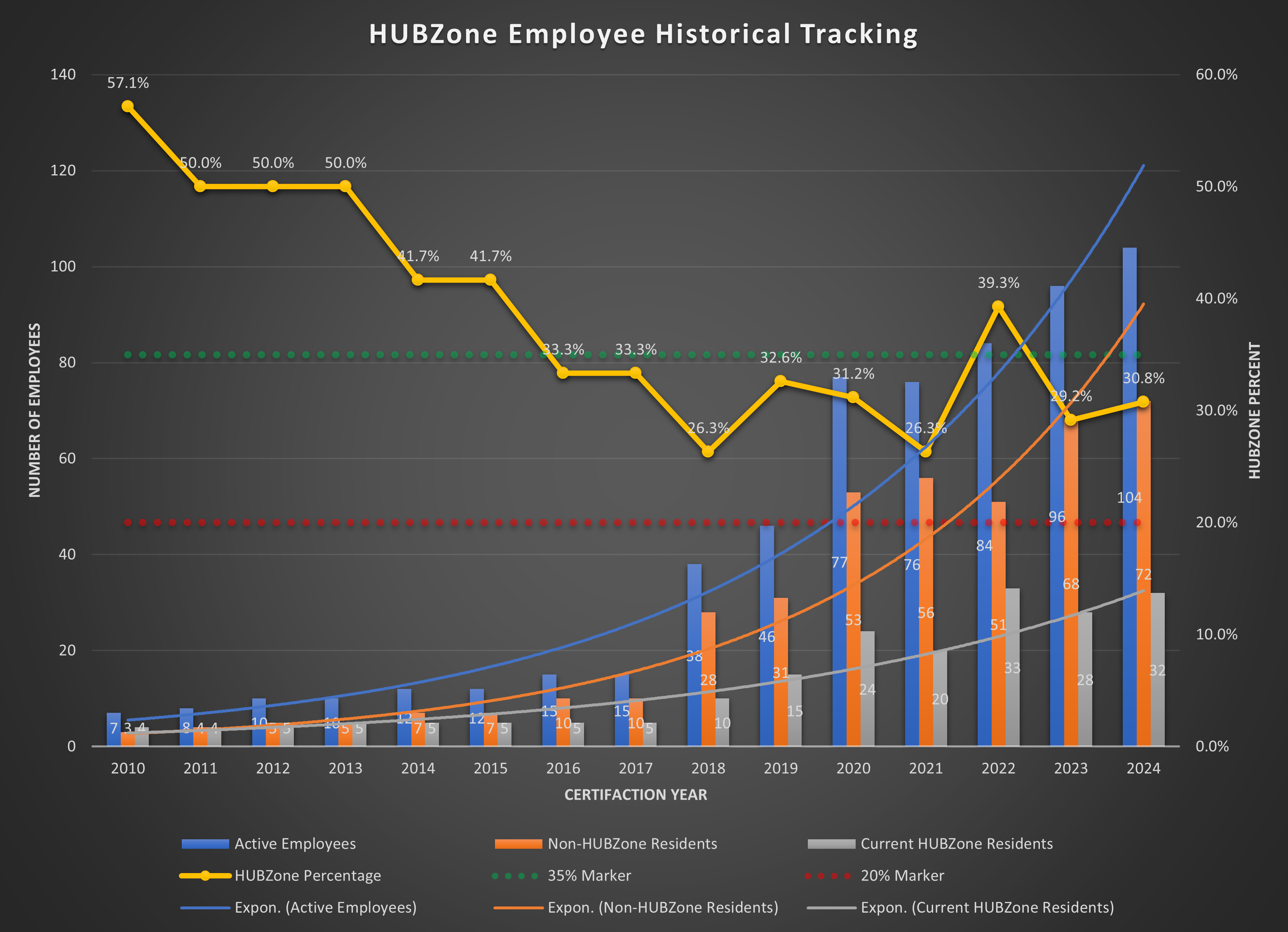
HUBZone Employee Historical Tracking chart. Blue bars: Active Employees. Orange bars: Non-HUBZone Residents. Gray bars: Current HUBZone Residents. Yellow line: HUBZone Percentage. Green dotted: 35% required. Red dotted: 20% decertification floor. The compliance line has not crossed the 35% threshold since 2015.
The 18-Month Data sheet tracks compliance across the trailing 18 months relative to a rolling reference date. Column headers are driven dynamically from the HiddenVariables sheet so the window advances automatically without manual updates. The lower section shows the current snapshot of active employees by work location code, with HUBZone and non-HUBZone counts per site.
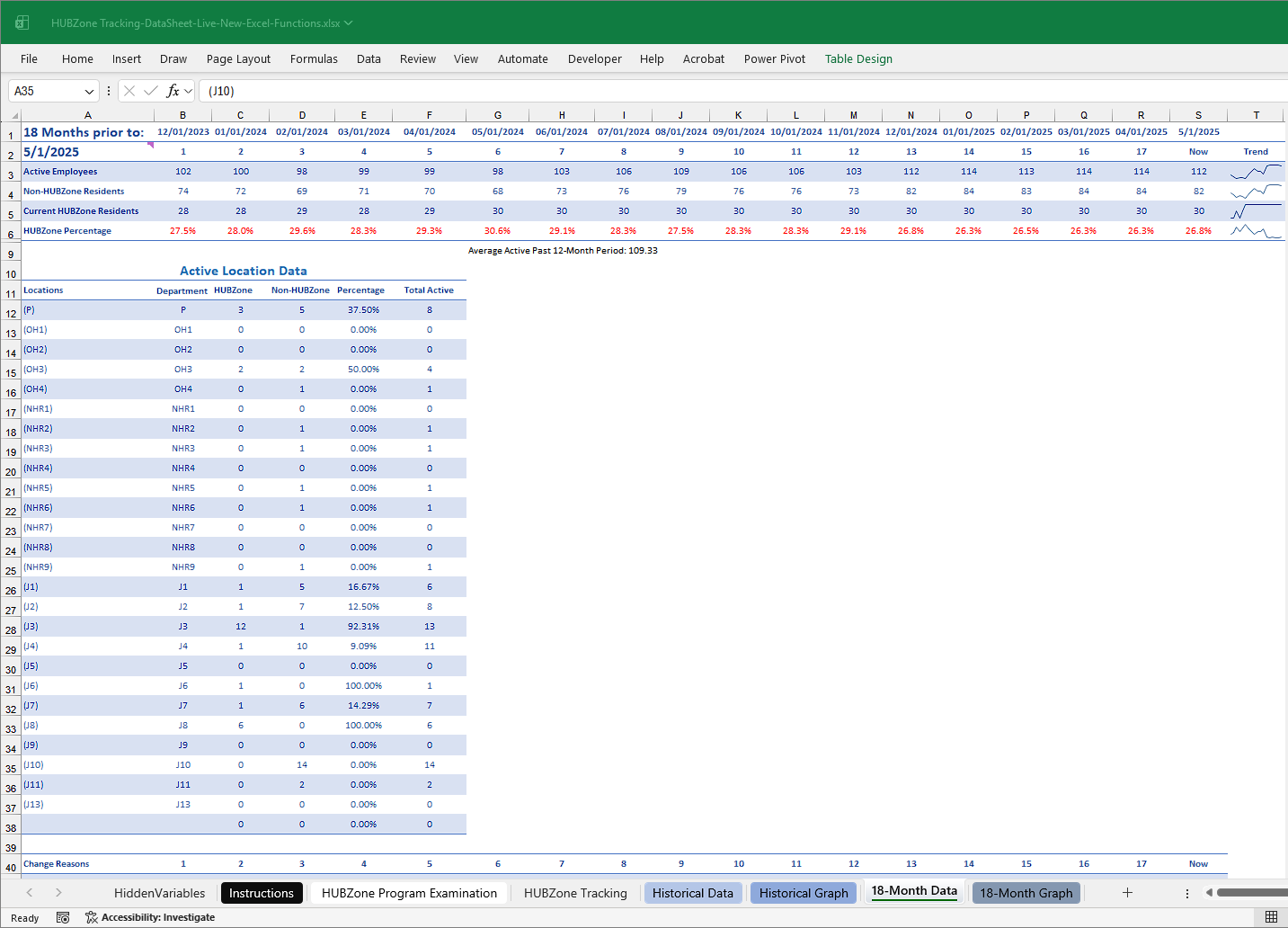
18-Month Data sheet. Rows 1-6: rolling monthly compliance metrics (Active Employees, Non-HUBZone Residents, Current HUBZone Residents, HUBZone Percentage, 35% Marker, 20% Marker). Active Location Data section (rows 10-37): location codes P, OH1-4, NHR1-9, J1-J13 with HUBZone/non-HUBZone counts and local percentages per site.
Month-by-month view of the same metrics shown in the historical chart, zoomed to the 18-month tracking window. The HUBZone resident count (gray bars, bottom) held at 30 for 13 consecutive months while active headcount grew from approximately 99 to 114. The compliance percentage line stayed flat or declined over the same period. This pattern was the basis for concluding the corporate structure was not defensible.
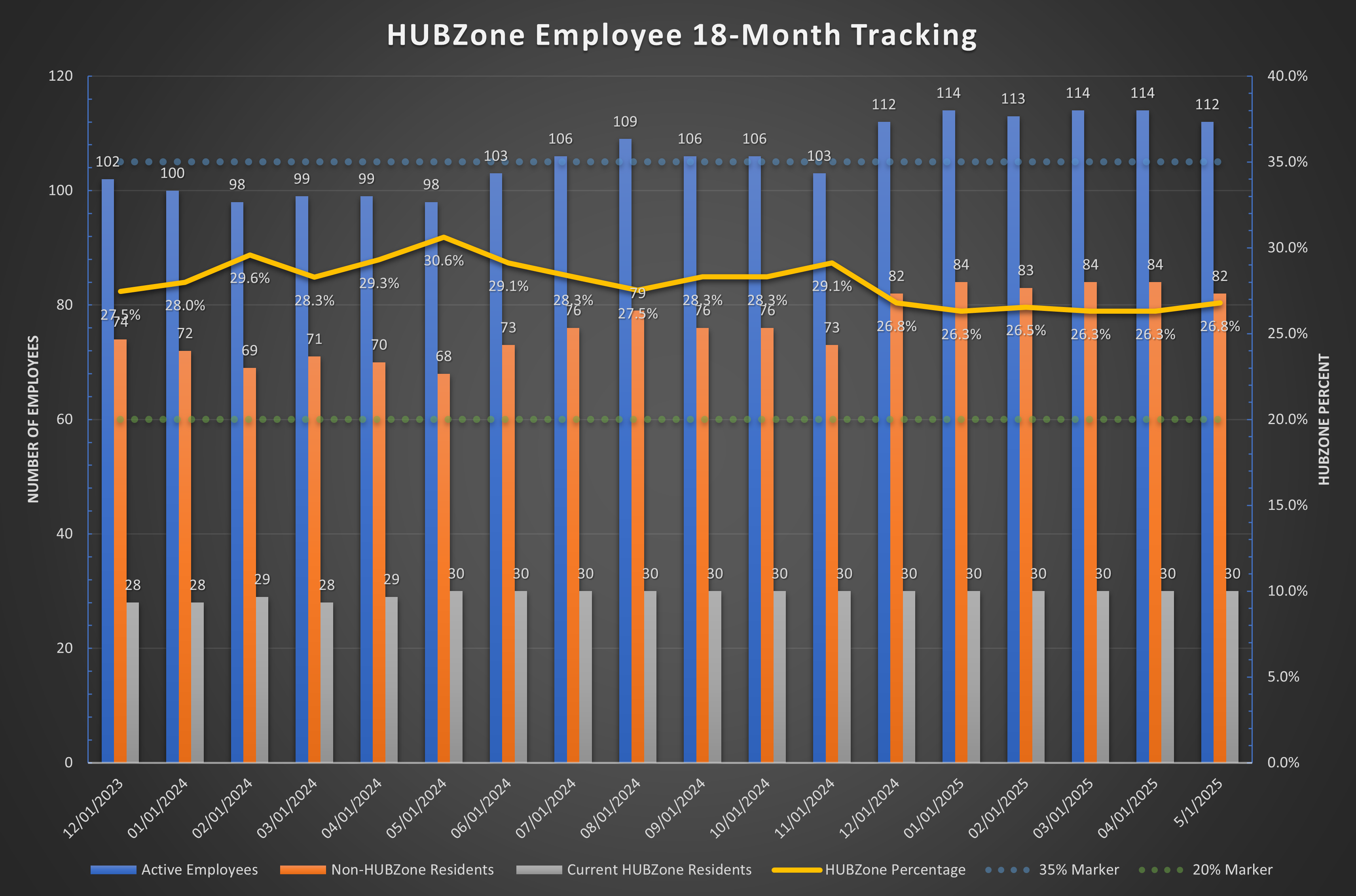
HUBZone Employee 18-Month Tracking chart. 12/01/2023 through 5/1/2025. The gray HUBZone resident bars remain constant at 30 across the full window while active headcount (blue) grew from 102 to 112. Compliance percentage (yellow line) stayed between 26% and 30% throughout, never approaching the 35% threshold (green dotted).
- 232 employee records structured as a named Excel table: HUBZone_Tracking
- Columns: Emp. #, Full Name, Work Location, Department Name, Status, Company ID, Hired, Client Name, Termination, Client ID, HUBZone Start, HUBZone Stop, Legacy Start, Legacy Stop, address fields, then annual columns 2010-2027, then 18 rolling monthly columns (1-18)
- Each annual and monthly cell contains a formula that evaluates active/HUBZone status for that period using hire date, termination date, and HUBZone residency dates against the HiddenVariables date windows
- Status codes: A | H (Active, HUBZone resident), A | N (Active, non-HUBZone resident), blank (not active during that period)
- Three rows of date calculations driving the rolling window for both the annual and 18-month columns
- Row 1: certification anniversary start dates (annual, 2009-2026)
- Row 2: certification anniversary end dates via EDATE chains
- Row 4: 18-month rolling window dates formatted as text via TEXT(EDATE(...)) for column header display
- Both sheets contain only COUNTIF formulas against the tracking table. No manually entered numbers
- Updating the tracking table automatically propagates through both summary sheets and their charts
| Year | Active Employees | HUBZone Residents | Compliance % | Status |
|---|---|---|---|---|
| 2010 | 7 | 4 | 57.1% | Above 35% |
| 2011–2013 | 8–10 | 4–5 | 50.0% | Above 35% |
| 2014–2015 | 12 | 5 | 41.7% | Above 35% |
| 2016–2017 | 15 | 5 | 33.3% | Below 35% |
| 2018 | 38 | 10 | 26.3% | Below 35% |
| 2019 | 46 | 15 | 32.6% | Below 35% |
| 2020 | 77 | 24 | 31.2% | Below 35% |
| 2021 | 76 | 20 | 26.3% | Below 35% |
| 2022 | 84 | 33 | 39.3% | Above 35% |
| 2023 | 96 | 28 | 29.2% | Below 35% |
| 2024 | 104 | 32 | 30.8% | Below 35% |
| 2025 | 112 | 30 | 26.8% | Below 35% |
Monthly compliance data from December 2023 through May 2025 (18 months). The HUBZone resident count held at 30 for 13 consecutive months while active headcount grew from 102 to 114. The compliance percentage declined over the same period. This is not a data anomaly. It reflects a structural condition where the HUBZone resident population had reached a ceiling while contract-driven headcount continued growing.
| Metric | Dec 23 | Mar 24 | Jun 24 | Sep 24 | Dec 24 | Mar 25 | Now |
|---|---|---|---|---|---|---|---|
| Active Employees | 102 | 99 | 103 | 106 | 112 | 114 | 112 |
| HUBZone Residents | 28 | 28 | 30 | 30 | 30 | 30 | 30 |
| Non-HUBZone Residents | 74 | 71 | 73 | 76 | 82 | 84 | 82 |
| Compliance % | 27.5% | 28.3% | 29.1% | 28.3% | 26.8% | 26.3% | 26.8% |
Current compliance breakdown by work location type, mirroring the SBA Program Examination form structure. Location codes follow the SBA classification: P (Principal Office), OH (Other HUBZone Location), NHR (Non-HUBZone Remote), J (Job Site).
| Location Type | Code | Locations | Employees | HZ Residents | Local % |
|---|---|---|---|---|---|
| Principal Office | P | 1 | 8 | 3 | 37.5% |
| Other HUBZone Locations | OH1-4 | 4 | 5 | 2 | 40.0% |
| Non-HUBZone Remote | NHR1-9 | 5 | 5 | 0 | 0.0% |
| Job Sites (all contracts) | J1-J13 | 9 | 68 | 23 | ~33.8% |
| Total | 17 | 86 | 28 | 32.6% |
Job site compliance varied significantly by contract: J3 (NASA/GSFC) at 92.3%, J8 (NASA/GSFC WMCLS) at 100%, while J4 (NASA/KSC) at 9.1% and J10 (NASA/GRC) at 0%. The overall percentage was pulled below threshold by the large non-HUBZone job site populations.
During a 2021 ownership reorganization, concerns were raised that the corporate structure between two affiliated entities would not hold up to SBA aggregation scrutiny under HUBZone rules. That recommendation was overruled. When an SBA examination approached two years later, no precise tracking data existed. The model had to be built from scratch from raw HR system exports.
- Each employee record contains hire date, termination date, HUBZone residency start/stop dates, and work location code
- Annual and monthly status columns are formula-driven. Adding a new employee record automatically propagates through all summary sheets
- Status codes update based on whether the employee was active and whether they resided in a HUBZone-qualifying address during each period
- Historical Data computes annual COUNTIF totals directly from the tracking table with no manual input
- 18-Month Data computes rolling monthly totals using the same COUNTIF pattern against numbered monthly columns (1-18)
- The HiddenVariables sheet drives the 18-month date window forward automatically via EDATE chains; no column relabeling required as time advances
- Historical chart shows the long-term trajectory: where the organization has been and where the trend line points
- 18-month chart shows the recent window in detail: month-by-month movement relative to the 35% threshold
- Location breakdown provides the SBA examination format directly, using the same structure the examination response requires
The model produced a conclusion that was not visible from the raw HR data: the HUBZone resident population had effectively reached a ceiling at approximately 30 people, while total headcount continued growing through contract wins. At 30 residents against a growing denominator, the compliance percentage would continue declining regardless of hiring practices, because new hires were concentrated at non-HUBZone job sites.
The forward projection confirmed this: even modest headcount growth would push compliance below 20% within the model's projection window. The 20% floor triggers mandatory decertification. The recommendation was to address the structural problem through the merger before the examination was filed. That recommendation was overruled. SBA aggregated the two entity workforces as predicted, collapsing the safe harbor entirely. The merger originally recommended in 2021 is now executing.
- Platform: Microsoft Excel with structured table references and newer Excel functions (LET, IFERROR, TEXT, EDATE, COUNTIF with wildcards)
- Structure: Multi-sheet workbook with a primary data table, a date calculation engine, two summary sheets, and two chart sheets
- Primary data source: Named Excel table HUBZone_Tracking (232 rows, 55 columns)
- Update model: Adding or modifying employee records automatically propagates through all summary sheets and charts via live formula references
- Date window: 18-month rolling window driven by EDATE chains in HiddenVariables; advances automatically without manual column relabeling
Individual employee records, hire/termination dates, home addresses, and entity-specific information have been removed from this documentation. Summary-level compliance data and formula architecture are presented here.
- Named table: HUBZone_Tracking. Columns A-S contain employee attributes; columns T onward contain period status columns (annual 2010-2027, then monthly 1-18)
- Each period column contains a formula that evaluates whether the employee was active and HUBZone-resident during that period, returning a two-character status code or blank
- Status codes: A | H (Active, HUBZone resident), A | N (Active, non-HUBZone resident), blank (not employed during that period)
- All summary sheets reference this table exclusively. No data is duplicated or manually maintained elsewhere
- Row 1: certification period start dates, annual 2009-2026
- Row 2: certification period end dates via =EDATE(prior, 12) - 1 chain
- Row 3: year labels (2010-2027) via simple increment chain
- Row 4: 18-month rolling window dates formatted as text via =TEXT(EDATE(next_col, -1), "MM/DD/YYYY"), which populates the column headers on the 18-Month Data sheet automatically
- Five rows: Active Employees, Non-HUBZone Residents, Current HUBZone Residents, HUBZone Percentage, 35% Marker
- Each cell is a COUNTIF against the corresponding annual column of the tracking table
- No manual data entry. The entire sheet updates when the tracking table changes
- Same five-row structure as Historical Data, applied to the 18 monthly columns
- Column headers reference HiddenVariables row 4 to display formatted dates
- Additional section: Active Location Data showing current snapshot by work location code
- 12-month average active employee count computed via AVERAGE across the trailing monthly window
- B2: =COUNTIF(HUBZone_Tracking[2010], "*A*")
- Counts any cell in the 2010 column of the tracking table that contains the letter A. The two-character status codes (A | H, A | N) both contain A, so this captures all active employees regardless of HUBZone status.
- B3: =COUNTIF(HUBZone_Tracking[2010], "*N*")
- Counts cells containing N. Only A | N contains N, so this returns active non-HUBZone residents exclusively.
- B4: =COUNTIF(HUBZone_Tracking[2010], "*H*")
- Counts cells containing H. Only A | H contains H, so this returns active HUBZone residents exclusively.
- B5: =IFERROR(B4/B2, 0)
- HUBZone residents divided by active employees. IFERROR suppresses divide-by-zero for future projection years where both counts are zero.
- B3: =COUNTIF(HUBZone_Tracking[1], "*A*")
- Column references use numeric labels (1-18) for the rolling monthly columns rather than year labels. The HiddenVariables sheet determines which calendar month each numeric column represents.
- B1: =HiddenVariables!A4
- Each column header on the 18-Month Data sheet pulls its date label from HiddenVariables row 4. As time advances and the HiddenVariables EDATE chain updates, all column headers relabel automatically.
- A4: =TEXT(EDATE(B4, -1), "MM/DD/YYYY")
- Each cell references the next cell in the chain, offset back one month via EDATE. The rightmost cell references a named range pointing to the current month header. The entire 18-month window of date labels is derived from this single anchor reference.
- Each annual and monthly status cell in the tracking table contains a formula that evaluates three conditions: whether the employee number is populated, whether they were employed during the period (comparing hire/termination dates against the HiddenVariables period boundaries), and whether they held HUBZone-qualifying residency during the period (comparing HUBZone start/stop dates). The formula returns A | H, A | N, or blank accordingly.
HiddenVariables (date engine)
  |-- Row 4 date labels --> 18-Month Data column headers (row 1)
  |-- Rows 1-2 period boundaries --> HUBZone_Tracking period status formulas

HUBZone_Tracking (primary table)
  |-- Annual columns (2010-2027) --> Historical Data COUNTIF formulas
  |-- Monthly columns (1-18) --> 18-Month Data COUNTIF formulas

Historical Data
  |-- Rows 2-5 --> Historical Graph chart series

18-Month Data
  |-- Rows 3-8 --> 18-Month Graph chart series
  |-- Rows 10-37 --> Active Location Data snapshot
All compliance figures in all views derive from a single tracking table via live formulas. There are no manually maintained summary cells. This eliminates the possibility of a summary sheet diverging from the underlying data.
The A | H / A | N encoding packs two pieces of information (active status and HUBZone residency) into a single cell. COUNTIF with wildcard patterns ("*A*", "*H*", "*N*") then extracts each dimension independently. This avoids maintaining separate columns for active status and HUBZone status while still supporting both queries from a single data cell.
The HiddenVariables EDATE chain means the 18-month tracking window advances automatically as months pass. A single anchor reference drives the entire column header system. No manual column relabeling is required to keep the rolling window current.
The location breakdown section of the 18-Month Data sheet uses the same location type codes (P, OH, NHR, J) and the same metrics (locations, employees, HUBZone count, local percentage) as the SBA Program Examination form. The model was designed so the examination response could be populated directly from the model output rather than requiring a separate data compilation step.